The engine and the console
The agent talks to the MCP server. The server drives the engine, a separate process where plans are made and applied. The engine holds the state lock, runs the OpenTofu® providers, and carries every convergence durably, so a rollout survives a server restart, a dropped client and the end of the conversation. The console is a window onto it.
The engine
Section titled “The engine”Durable runs. A convergence lives in the engine, not in the server or the chat. If the conversation
ends while a round waits for approval, the run waits; open or status on the workspace reports it,
and apply picks it up where it stands. A pause lasts 24 hours at a plan gate, an approval point or a
turf action; past that the server detaches and the run keeps waiting in the engine. The engine is built
on Restate for this durability. Turf™ names it plainly: every step of a run is journaled, and a step
that was in flight when something died is resumed, not repeated.
Where it runs. On your machine, the server starts the engine when a tool first needs it and none
is running. The engine then runs in the background, outliving the server and the client, and every
server on the machine shares it. The turf Homebrew service (brew services start turf) starts the
same engine at login instead and takes over one a server started; turf-mcp-server engine run runs
it in a terminal. turf-mcp-server engine status reports where it listens, how it was started, its
processes and versions, the console’s address and its logs, and engine stop stops it. It listens only where your account can reach it. init, the provider tools and
the skills work without an engine; everything that plans needs one. In a cluster the engine is a
Deployment with as many replicas as you like, and any step lands on any replica:
Running Turf in a cluster.
One line. A server drives an engine of its own line (the same major and minor version) and refuses
another, naming both. After a minor upgrade the engine still running is the old line’s: turf-mcp-server engine stop ends
one a server started, and the next call starts the new one; brew services restart turf restarts the
service. A run that was waiting on the old one ends cancelled, what was applied is kept, and
up again plans over it. Running the engine beside the agent, rather than inside the CLI, is also why
providers read the engine’s environment and the variables you name for them, rather than your shell’s:
Where credentials are read.
Scale-out. Refresh, plan and apply fan out per resource inside the engine, so the cloud API, not the tool, is the ceiling on a large configuration.
The console
Section titled “The console”The console is a read-only web view of every workspace’s runs, rounds and approvals, running beside the
engine at http://127.0.0.1:8873 on a laptop. Every result the server hands the agent carries a link
into it (console_url), the page for the round it is about, and the agent is asked to give you that
link, above all at an approval point. When the agent says “the plan is ready”, there is a page to look
at.
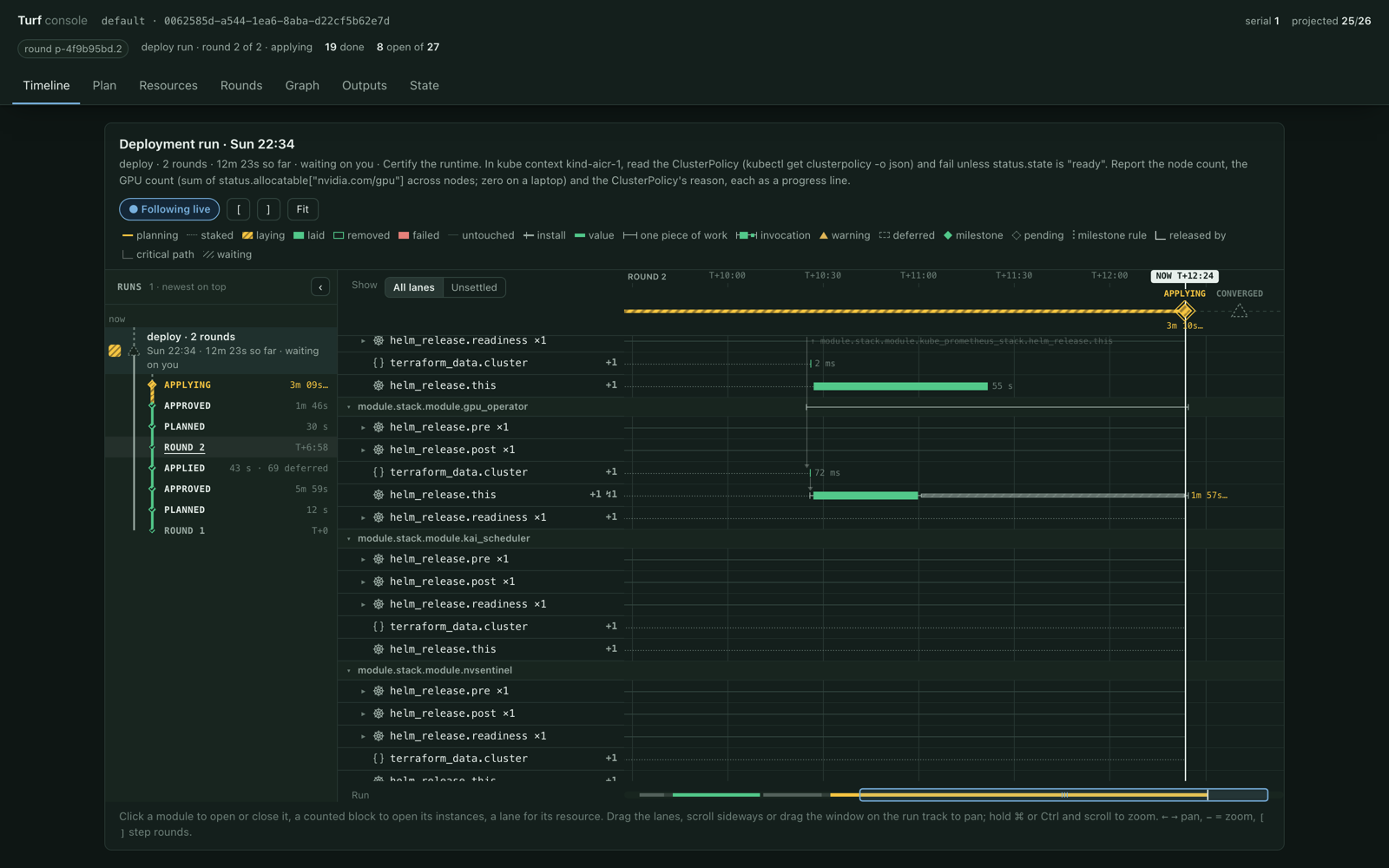
A round's page: the plan, who approved it, and the apply paused at a turf action.
What it shows. A workspace opens on its runs, newest first, each opened into its rounds: what each round is doing or how it ended, the plan’s size, its approval point and who gave it, how long it took. A round’s page tells its story from the engine’s own stamps: the plan gate while it is open, the plan with its counts by action, the approval point with the approver and the plan’s digest, the apply, any turf action the apply is asking, and how the round ended the run.
| Tab | Shows |
|---|---|
| Runs | The workspace’s convergences, newest first, each with its rounds. A run that cleared drift notices says how many. |
| Timeline | Every resource’s lane as the apply runs, live. |
| State | What the workspace holds: its outputs and every address, each opening to its committed record. |
| Drift | The workspace between runs: open drift notices, how much is swept or uncovered, and whether the sweep keeps to its cycle. |
| Round | One round’s story: plan gate, plan, approval, apply, end. |
| Plan | The round’s plan, counted by action. |
| Graph | The round’s configuration graph. |
Read-only, and yours. Approvals are given where they always were, by the agent or the CLI; the
console changes nothing. Only you can open it: turf console signs your browser in once
(npx -y @turfbuild/turf-mcp-server engine console with the npx install), and every
link opens directly after that. TURF_CONSOLE_ADDR moves it to another loopback address or turns it
off (off); the engine does not depend on it. In a cluster the console takes a token
(TURF_CONSOLE_AUTH_TOKEN) and the server is told where it lives (TURF_CONSOLE_URL) so the links
point there: The console in a cluster.
Related
Section titled “Related”- Install locally: how the engine starts,
engine status, upgrading. - The engine’s environment
- When something goes wrong: picking up a run the engine is holding.
Turf™ is a trademark of Turf LLC. Terraform® is a trademark of HashiCorp. Ansible® is a trademark of Red Hat, LLC, registered in the United States and other countries. Helm®, Kubernetes®, Prometheus® and OpenTelemetry® are registered trademarks, and Jaeger™ is a trademark, of the Linux Foundation. OpenTofu® and Model Context Protocol® are registered trademarks of LF Projects, LLC. All other trademarks are the property of their respective owners. Turf is not affiliated with, endorsed by, or sponsored by HashiCorp, IBM, Red Hat, the Linux Foundation, LF Projects or the OpenTofu project.
© 2026 Turf LLC. Free for individuals, education and small businesses within the Community limits, under the Turf Community Edition License 1.0. Government and larger organizations need a commerciallicense.turf.build · Discord ·GitHub