Demo · Turf loves TACOs

Turf speaks your control plane's language.

Turf is an MCP server at its core, and Terraform®-compatible from HCL to state. Point it at the automation platform you already run and it brings that platform — your state backend, your variables, your OPA policy checks — into its own planning and execution loop, through the platform's own MCP tools and a skill that knows how to drive them. Worked here with Scalr.

How it works

Two MCP servers and a skill.

There is no Scalr plugin inside Turf. The integration is configuration: a mcps: block naming the servers to connect to, and a skill that carries the call sequences. Turf reads both at start-up, and the platform's tools sit alongside its own for the rest of the session.

.turf/turf.yaml the whole integration
# External MCP servers the Turf session connects to alongside its own
# turf-mcp-server. Tools arrive namespaced: scalr_* and opa_*.
mcps:
  scalr:
    command: docker
    args: [run, --rm, -i, --env, SCALR_API_TOKEN, --env, SCALR_API_URL, scalr/mcp-server:latest]
  opa:
    command: docker
    args: [run, --rm, -i, orygn/opa-mcp:latest]

The skill sits beside it in .turf/skills/scalr/ — when to load, which call resolves a workspace name to an ID, how a policy group leads to the rego that governs it. The tools are the reach; the skill is knowing what to do with them. That is how a platform teaches Turf its own conventions without anyone shipping a new Turf.

And because Turf is an MCP server first, none of this is tied to a terminal. The same session runs under any MCP client over stdio or HTTP, inside a container in CI, or in-cluster as an agent via kagent — interactively, as in the run below, or unattended with tool approval delegated for the whole session. Driving Turf from other agents over the network is coming soon.
01 · State

Your platform holds the state.

The Scalr workspace here is state-storage-only: it holds state and executes nothing. Turf declares a remote backend against it and opens it for the session. Turf is the engine, Scalr is the control plane — and everything that follows happens because Scalr never gets a run of its own to hang its features on.

Turf's session log: Declare Backend remote, declared into main.tfplot.hcl, with hostname turf.scalr.io, organization turf-demo, and workspaces name turf-scalr-chat; then Open Workspace default, remote.
The backend is authored in the session, then opened — state lives in the turf-scalr-chat workspace from here on.

02 · Variables

Your platform holds the variables.

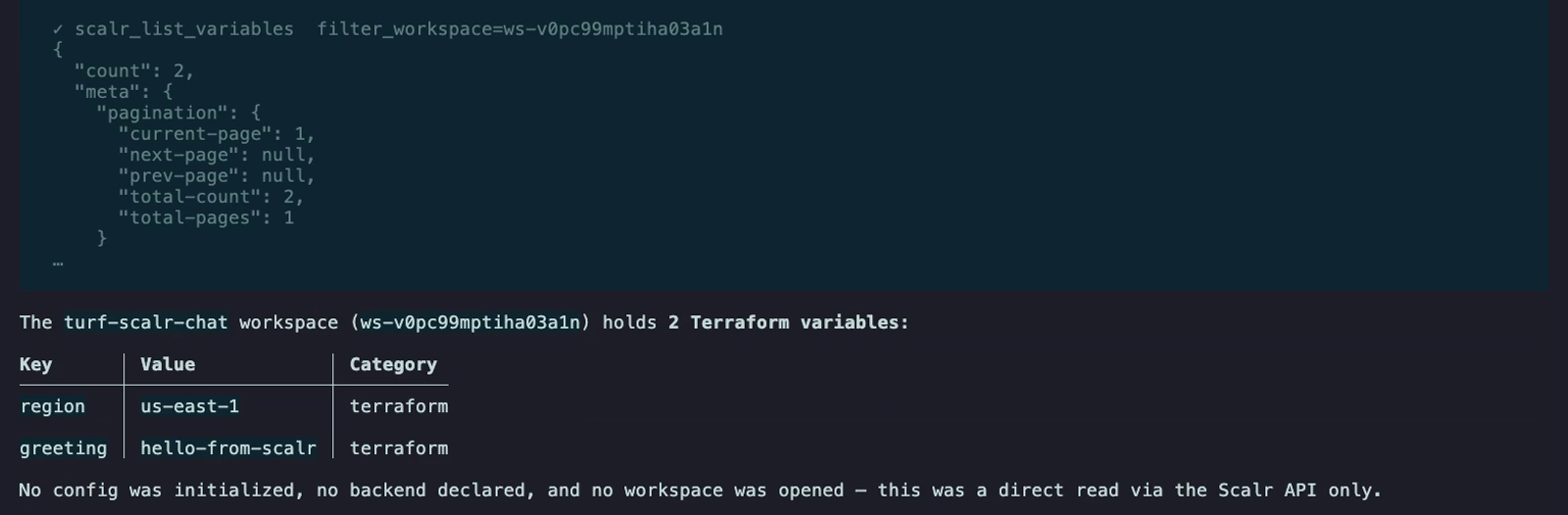
Scalr injects workspace variables into runs that Scalr executes. There is no such run here — so nothing is injected, and on a state-storage-only workspace those variables would simply go unused. Turf asks the Scalr API for them instead, over the same MCP connection, and they are available to the plan like any other input.

Turf's session log: a scalr_list_variables call against the turf-scalr-chat workspace, the raw Scalr API response, and Turf's summary table listing the Terraform variables region = us-east-1 and greeting = hello-from-scalr. A closing line reads: no config was initialized, no backend declared, and no workspace was opened — this was a direct read via the Scalr API only.
Variables read straight from the control plane, in the middle of the session that needs them — no config, no backend, no workspace opened.

03 · Policy checks

Your platform's policy, at the decision point.

Same shape, higher stakes. Scalr's OPA policy checks also fire only on Scalr-executed runs, so this workspace gets none of them. Turf goes and finds them: which policy group governs the workspace's environment, which rego it points at, and what each policy's enforcement level is. Then it exports the plan and hands both to OPA.

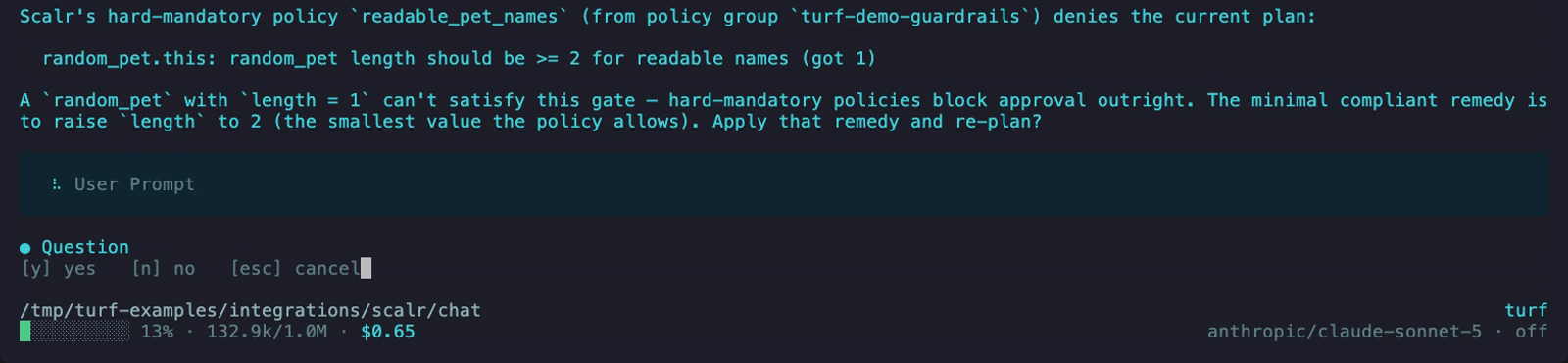
The ask was a random pet with name length 1. Nothing told Turf that was a problem — readable_pet_names is hard-mandatory and requires 2.

Turf's session log: Scalr's hard-mandatory policy readable_pet_names, from policy group turf-demo-guardrails, denies the current plan because random_pet length should be at least 2 and got 1. Turf proposes raising length to 2 and asks whether to apply that remedy and re-plan, with a yes / no / cancel prompt.
The check runs on the plan, before the apply — and the denial stops it there.

Hard-mandatory is not advice a session can talk its way past. The plan is not approvable, so the only way forward is a plan that complies — and changing what you asked for is itself a decision, so it comes back to you as a question rather than something quietly fixed on the way through.

Nothing here is a Turf-specific rewrite of your governance. It is the rego already synced into the policy group, in the shape Scalr expects — package terraform, a deny set of readable strings, the plan at input.tfplan:

policies/readable_pet_names.rego hard-mandatory · synced to the Scalr policy group
package terraform

import rego.v1

deny contains reason if {
  some rc in input.tfplan.resource_changes
  rc.type == "random_pet"
  rc.change.after.length < 2
  reason := sprintf(
    "%s: random_pet length should be >= 2 for readable names (got %d)",
    [rc.address, rc.change.after.length],
  )
}

04 · The apply

Remedied, re-checked, applied.

You approve the remedy. Turf re-plans at the compliant length, re-evaluates both policies, and brings the corrected plan back for the ordinary approval — then applies it and writes the state to Scalr.

The last seven seconds of the run: both policies pass, the plan is approved, and model-goshawk is created at the length the policy requires — with Turf saying plainly why you didn't get the 1 you asked for.

The same composition reaches the rest of the platform: a module from your private registry, your org's own skills, whatever else the control plane exposes. And it matters most where nobody is watching — the session runs unattended just as well, and a policy check that lives inside the loop still stops the plan when it has to.

Run it yourself → Install Turf → Kubernetes demo →